Reading PE Headers by Hand: 32-bit vs. 64-bit, Five Tools, One Hex Editor
Hashing, section tables, entry points and the Rich header for three Windows binaries, cross-checked with pev, radare2, pefile, objdump and a hex editor. Building the same source as 32-bit and 64-bit shows exactly what bitness changes.
Static triage of a Windows sample starts with the PE header: hashes, sections, entry point, imports, and whether it’s an EXE or a DLL. Tools show all of that instantly, but I wanted to know exactly where each value comes from, and whether different tools agree.
All of this ran on Linux. A PE file is just bytes laid out in a known format, so you don’t need Windows to read it.
Choosing Samples on Purpose
I used three files from the official CPython 3.14.7 Windows embeddable packages on python.org:
python.exe, the 32-bit (win32) buildpython314.dll, the 32-bit DLLpython.exe, the 64-bit (amd64) build
Using the same source built for two architectures makes the 32-bit vs. 64-bit comparison a controlled experiment. Any header difference comes from bitness, not from two unrelated programs.
The Toolkit
- pev (
readpe,pehash): dedicated PE toolkit - radare2 (
rabin2,rahash2): general binary analysis - pefile (Python) and objdump: tie-breakers when the first two disagree or leave a field out
- xxd and ghex: for checking values in the raw bytes
I wrapped every command in one script (run_analysis.sh) that writes a report per file. That way the same flags run against every sample, and the whole thing can be re-run from scratch.
What the 32-bit EXE Looks Like
| Section | Virtual address | Virtual size | Raw pointer | Characteristics |
|---|---|---|---|---|
.text |
0x1000 | 0xdf2 | 0x400 | CODE, EXECUTE, READ |
.rdata |
0x2000 | 0xb38 | 0x1200 | INIT. DATA, READ |
.data |
0x3000 | 0x3d0 | 0x1e00 | INIT. DATA, READ, WRITE |
.rsrc |
0x4000 | 0x13c20 | 0x2000 | INIT. DATA, READ |
.reloc |
0x18000 | 0x184 | 0x15e00 | INIT. DATA, DISCARDABLE, READ |
The entry point RVA is 0x1262 with ImageBase 0x400000. To find it in the file, take the RVA, subtract the section’s virtual address, and add its raw pointer: 0x1262 - 0x1000 + 0x400 = 0x662. All four tools agreed.
I also hashed the whole file and individual sections (pehash, cross-checked with pefile). Section hashes are useful in malware work because a repacked sample often keeps an identical .text even when the file hash changes.
Checking the Header Offset in the Bytes
readpe -H says the PE header starts at 0x108. Here’s that in the raw bytes:
- Offset 0 holds
4D 5A, which is “MZ”, the DOS header magic. - Offset
0x3Cise_lfanew, the pointer to the PE header. The bytes are08 01 00 00. Read little-endian, that’s0x00000108. - Offset
0x108holds50 45 00 00, which is “PE\0\0”. The next two bytes,4C 01, are the Machine field (0x014C, i386), which independently confirms it’s the 32-bit build.
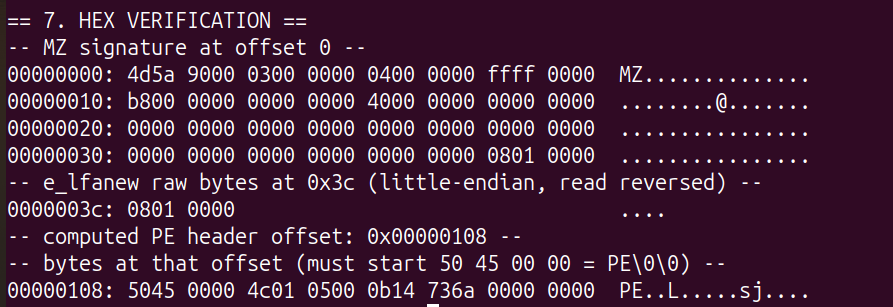 MZ at 0,
e_lfanew at 0x3C, and “PE\0\0” right where it points.
I checked the same offsets again in ghex so I wasn’t relying on a single tool for the byte check either.
How You Know It’s a DLL
The file extension doesn’t prove anything. Two things in the headers do:
- The COFF
Characteristicsfield is0x2102, which includesIMAGE_FILE_DLL(0x2000). - The export directory is populated (VA
0x516270, size0xdbc0) with 275+ exported CPython functions such asPyArg_ParseTuple.
The DLL also has a non-standard section called PyRuntim (the section name field is 8 bytes, so PyRuntime gets cut off). It’s the kind of unusual section name worth noticing when you triage an unknown sample.
32-bit vs. 64-bit, Field by Field
| Field | PE32 (32-bit) | PE32+ (64-bit) |
|---|---|---|
| Machine | 0x14C (I386) |
0x8664 (AMD64) |
| Optional header magic | 0x10B |
0x20B |
| SizeOfOptionalHeader | 0xE0 (224 bytes) |
0xF0 (240 bytes) |
| BaseOfData | present (0x2000) |
removed |
| ImageBase | 0x400000 (DWORD) |
0x140000000 (QWORD) |
| Stack/heap reserve + commit | DWORD each | QWORD each |
| Characteristics | IMAGE_FILE_32BIT_MACHINE |
IMAGE_FILE_LARGE_ADDRESS_AWARE |
| Exception data | no .pdata |
.pdata section |
| PE header offset | 0x108 |
0xF8 |
Most of this is mechanical: every pointer-sized field grows from 4 to 8 bytes, and BaseOfData is dropped to make room for the 8-byte ImageBase.
The .pdata section is the most interesting difference. x64 Windows uses table-based exception handling: every non-leaf function has an unwind entry in .pdata describing how to undo its prologue. 32-bit x86 uses frame-based SEH chained on the stack instead, so it doesn’t need this table. For reverse engineering, .pdata is a big help, because it gives you the start and end of almost every function in the binary.
Where the Tools Disagreed
All the tools agreed on the values. They didn’t agree on what they show you or how you have to ask for it.
Hashing. pehash gives file and per-section hashes in one command. radare2’s rabin2 -t returned nothing for a ~100 KB file, because radare2 skips hashing above a bin.hashlimit threshold. You need the separate rahash2 tool. If you only used rabin2 you could wrongly conclude it can’t hash the file at all.
Naming. rabin2 -S calls the columns paddr/vaddr. readpe -S uses the PE spec’s names (“Pointer To Raw Data”, “Virtual Address”). Same values, different vocabulary.
The Rich header. rabin2 -H prints a RICH_FIELDS block by default. This is the undocumented header the Microsoft linker leaves between the DOS stub and the PE header, recording which compiler and linker builds produced the object files. readpe -A, in the version I had, doesn’t show it anywhere.
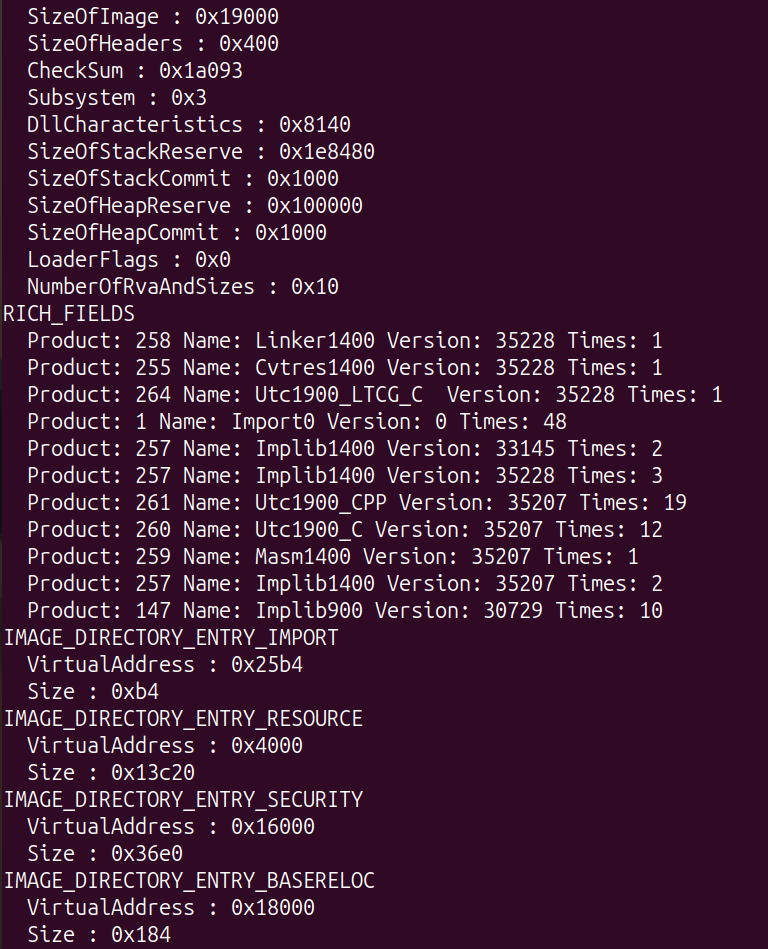 The Rich header: Linker1400, Utc1900_CPP, Masm1400 and their build numbers. pev doesn’t show this at all.
That matters for malware triage. The Rich header is a toolchain fingerprint that can link samples built on the same setup, and because of that it can also be forged to mislead attribution (Olympic Destroyer is the well-known case). The 64-bit build’s Rich header also contains a Utc1900_POGO_O_C entry, a profile-guided optimization marker the 32-bit build doesn’t have. Even the “same source” builds weren’t built quite the same way.
Flag spelling. Some references describe readpe -O for the optional header. My pev build doesn’t have it. The equivalent is readpe -h optional.
Takeaways
- Learn where each value lives in the bytes, so you can check a tool’s output when it matters.
- Run two tools. They rarely disagree on values, but one will often show something the other leaves out (the Rich header here).
- On x64, the
.pdatasection gives you nearly every function’s boundaries.