Drawing the Perimeter: ESP, EAP, and Remote Access under CIP-005
Drawing the Electronic Security Perimeter around the OT zone with OPNsense as the Electronic Access Point, forcing all Interactive Remote Access through a jump host, and being honest about the three things the perimeter still doesn't stop.
The last three posts built something worth protecting: a live simulated power grid (post 2) that speaks DNP3, the industrial protocol real substations use (post 3). And it left off somewhere uncomfortable: because DNP3 has no authentication, the command that sabotages the grid and the command an operator sends on a normal day are the same bytes. There’s nothing in the message itself to catch.
When you can’t tell a bad command from a good one, you’re left with a different question: who was even able to send it in the first place? That’s what this post is about. If you can’t trust the message, you have to trust the network instead, so I put a wall around the equipment and make every remote connection come through one hardened door that I control and watch.
In the regulations that’s CIP-005, and it comes with three terms I’ll define properly below: the wall is an Electronic Security Perimeter, the door is an Electronic Access Point, and the thing you have to pass through to get in is an Intermediate System, which is what most people call a jump host or bastion.
I build all of it. Then I show the three ways it still falls short, because that’s where you actually learn how a perimeter works.
Where this fits. Post 4 of the series, and the first defensive control. I’ll walk CIP-005 as a Responsible Entity would: current state → finding → risk → remediation.
What is CIP-005?
CIP-005 (Electronic Security Perimeter(s)) is the NERC CIP standard governing the network boundary around BES Cyber Systems and how anyone reaches through it remotely. Two requirement areas matter here:
- R1 — the ESP. Every BES Cyber System with routable connectivity lives inside a defined Electronic Security Perimeter, and all traffic crossing it passes through an Electronic Access Point (EAP) — a firewall interface enforcing inbound and outbound access permissions with a documented reason for each.
- R2 — Interactive Remote Access (IRA). “Interactive” means a human at a keyboard, as opposed to two machines exchanging data on a schedule. Any such access into the ESP must route through an Intermediate System — a jump host: a single hardened machine that sits outside the protected zone and is the only thing permitted to open sessions into it. You log into it, then from it into the equipment. The session must be encrypted up to that host, and it must enforce multi-factor authentication.
Why a jump host, rather than just a good firewall rule? Because it collapses every possible way into the OT network down to one machine — one place to harden, one place to log, one place to revoke someone’s access the day they leave. A firewall rule tells you a connection was allowed. A jump host lets you record what the person actually did.
The design
Two trust zones, each an isolated libvirt network on the KVM host, joined only by an OPNsense VM with a leg in each. The firewall’s OT-facing interface is the EAP, and the boundary it enforces is the ESP.
flowchart TB
vendor["Internet / "vendor"<br/>192.168.122.0/24"] --> fw
subgraph mgmt["Management zone — 10.10.10.0/24, outside the ESP"]
fw["OPNsense<br/>WAN_VENDOR / MGMT / OT_ZONE"]
jump["mgmt-jump — 10.10.10.10<br/>(Intermediate System)"]
fw --- jump
end
subgraph esp["ESP — 10.10.20.0/24, BES Cyber System"]
grid["ot-grid .10<br/>pandapower"]
plc["ot-plc .11<br/>DNP3 outstation"]
scada["ot-scada .12<br/>SCADA master"]
end
jump -->|"SSH 22 only — the sole path in"| esp
vendor -. "no direct path" .-> esp
Making the zones isolated in libvirt matters more than it looks. An isolated network has no NAT and no route to the host’s uplink, so the only way anything leaves the OT zone is through the interface I explicitly gave the firewall. The perimeter is enforced by the topology of the virtual network, not just by firewall rules, which is a much stronger thing to be able to show an auditor.
Three interfaces, named for what they are rather than what OPNsense calls them by default:
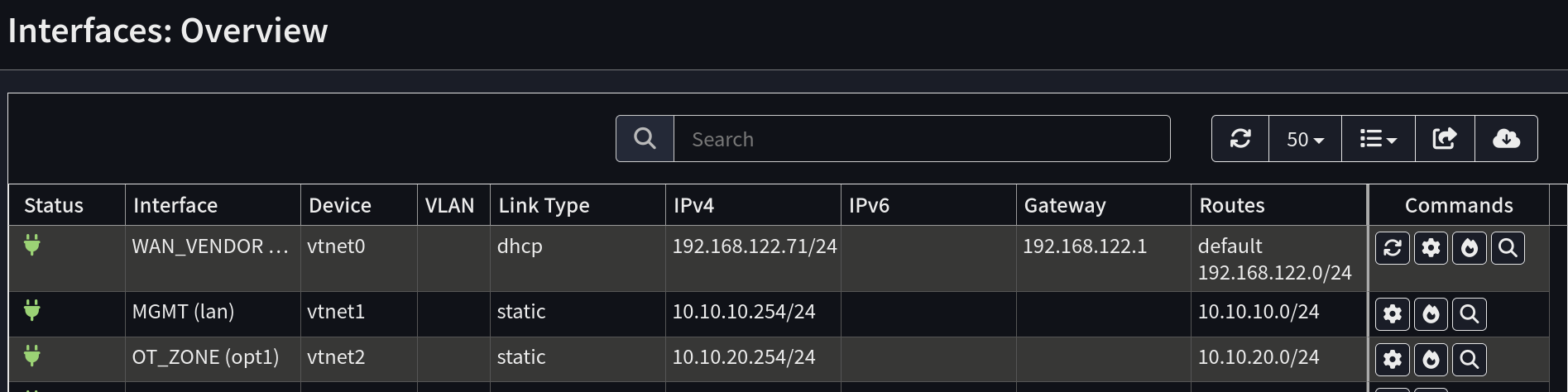 WAN_VENDOR takes a DHCP lease from the “internet”; MGMT and OT_ZONE are static. Note the Gateway
column: only WAN has one. Nothing inside the ESP has a route to anywhere by default.
WAN_VENDOR takes a DHCP lease from the “internet”; MGMT and OT_ZONE are static. Note the Gateway
column: only WAN has one. Nothing inside the ESP has a route to anywhere by default.
Setting it up
1. The EAP ruleset (CIP-005 R1)
Here is the part that surprised me, and it is worth slowing down for.
The rules that protect the ESP do not live on the OT-facing interface. OPNsense — like pfSense and every other pf-based firewall — evaluates traffic on the interface where it enters the firewall. Traffic from the management zone heading into OT arrives on MGMT, so that is where it gets filtered. Put your rules on OT_ZONE and they will govern traffic leaving the ESP, which is a different control entirely.
OT_ZONE, meanwhile, needs no rules at all. OPNsense creates none on optional interfaces, and no rules means default-deny. The egress half of the perimeter existed the moment the interface came up.
So the ruleset is two rules on MGMT. First, the one permitted path:
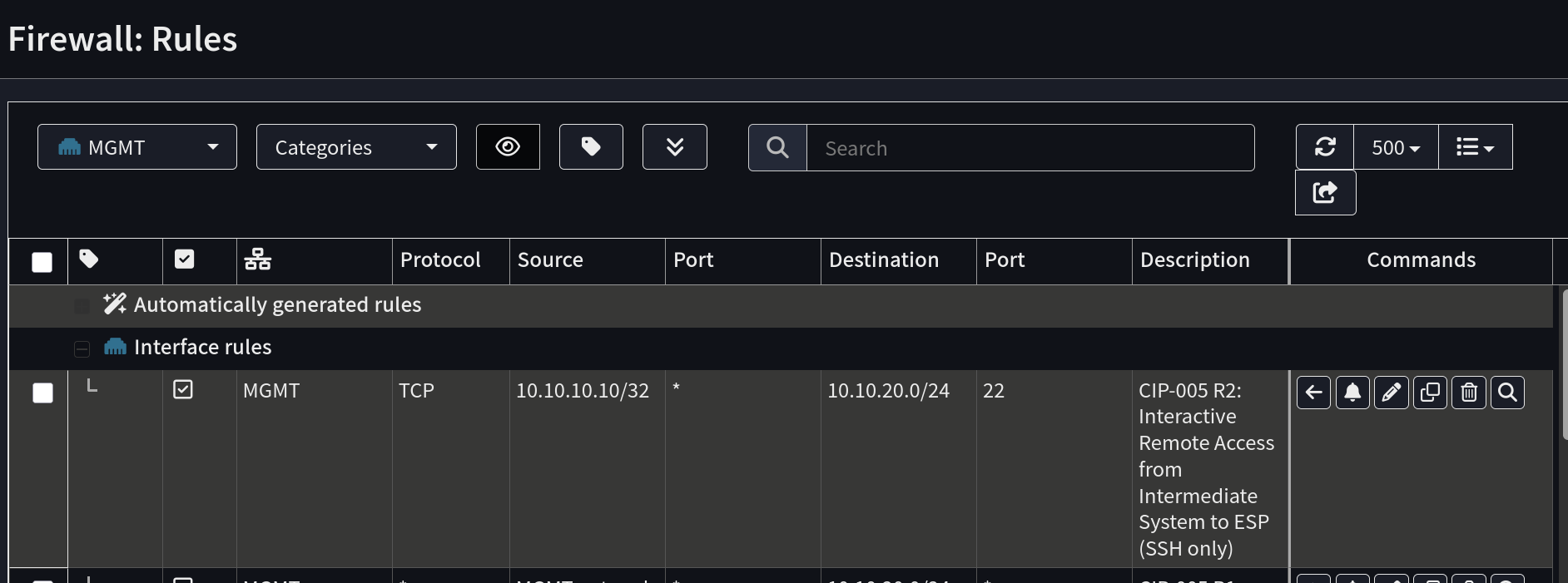 One source host, one destination network, one port. The description is the CIP-005 R2
justification, and it travels with the rule into every log entry it produces.
One source host, one destination network, one port. The description is the CIP-005 R2
justification, and it travels with the rule into every log entry it produces.
Then the deny rule, and just as important, where it sits:
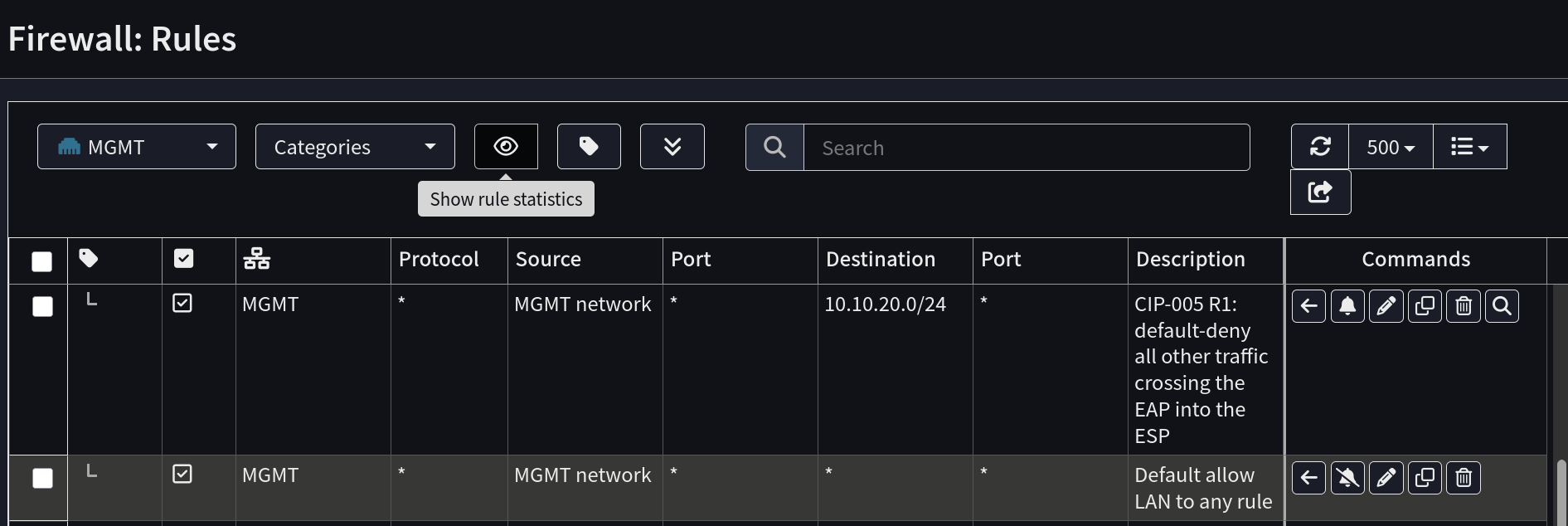 The deny sits directly above
 Default allow LAN to any rule. That ordering is the whole
mechanism: pf takes the first match, so a deny placed below the stock permit would never fire.
In pf’s compiled output, the intent becomes unambiguous:
1
2
3
pass  in log quick on vtnet1 inet proto tcp from 10.10.10.10 to 10.10.20.0/24 port = ssh
block drop in log quick on vtnet1 inet from (vtnet1:network) to 10.10.20.0/24
pass  in quick on vtnet1 inet from (vtnet1:network) to any
Note the bell icons in that screenshot: logging is enabled on my two rules and struck through on the stock one. That’s on purpose. A rule that denies without logging tells you nothing after the fact, and after the fact is exactly when an assessor comes asking.
2. The Intermediate System (CIP-005 R2)
mgmt-jump at 10.10.10.10 — a minimal Ubuntu VM in the management zone, outside the ESP. It is
the only address permitted to open a session into the OT network, and only on TCP 22.
3. Remove the routes, not just the permissions
A firewall rule is a permission you grant. A missing route is a capability that just isn’t there at all, and that’s harder to get wrong.
None of the three OT hosts has a default gateway. Each carries exactly one static route:
1
2
3
$ ip route
10.10.10.0/24 via 10.10.20.254 dev ot0 proto static onlink
10.10.20.0/24 dev ot0 proto kernel scope link src 10.10.20.12
That’s the entire routing table. There’s no default route to carry a packet toward the internet even if a firewall rule were wrong, and no path to any network except the management zone. It’s a second layer on top of the firewall rules, and it costs nothing.
Example: the outside can’t reach the grid
From the Intermediate System, which is the most privileged host outside the ESP, every industrial protocol gets refused and only SSH goes through:
1
2
3
4
5
bruce@mgmt-jump:~$ nc -z -w4 10.10.20.12 22    && echo permitted
permitted
bruce@mgmt-jump:~$ nc -z -w4 10.10.20.11 20000 && echo permitted   # DNP3
bruce@mgmt-jump:~$ nc -z -w4 10.10.20.10 502   && echo permitted   # Modbus
bruce@mgmt-jump:~$ nc -z -w4 10.10.20.10 8080  && echo permitted   # grid HTTP
Three silences and one success. The DNP3 outstation that took post 3 a whole post to reach is now unreachable from outside the perimeter, including from the jump host itself, which is allowed in but not allowed to speak industrial protocols once it’s there.
And the EAP says so in its own words:
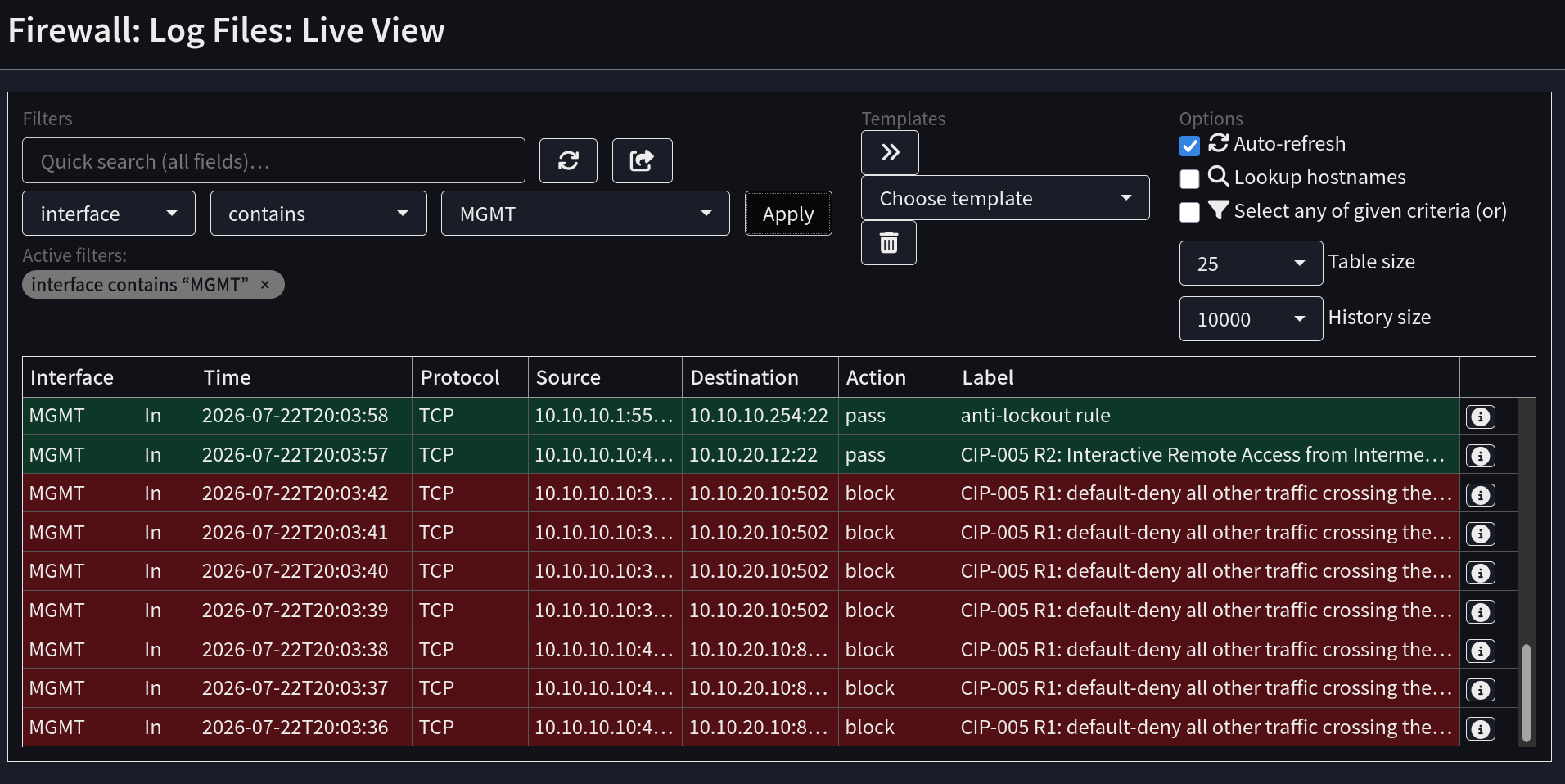 Same source host, same interface, seconds apart:
 pass on 22, block on 502 and 8080 — each
line carrying the rule description that decided it.
That screenshot is the closest thing this series produces to real compliance evidence. It’s not a diagram of what I intended, it’s the device writing down its own decisions, with the CIP citation attached to each one.
Example: the sanctioned path
Same destination, correct route — through the Intermediate System:
1
2
$ ssh -J [email protected] [email protected]
reached ot-scada — only path is via Intermediate System
That’s CIP-005 R2 working the way it’s written: one door in, and it’s watched.
Verifying it worked
The perimeter is real if all four hold:
- The permitted path works — jump host reaches
ot-scadaon 22. - Everything else is denied — DNP3, Modbus and HTTP all dropped from the same source.
- The EAP logs both decisions, attributable to a specific rule.
- The hypervisor has no shortcut. This is the one people skip.
That fourth point deserves its own paragraph, because I failed it for most of the build.
Throughout posts 2 and 3 the KVM host held 10.10.20.1 on the OT bridge; it was how I ran every
command, took every screenshot, and copied every file. But a host with an address inside the ESP is
inside the ESP, and it bypasses the EAP completely. You can’t really claim to have drawn a perimeter
if you’re sitting inside it the whole time.
So the host’s address came off the OT segment entirely:
1
2
3
4
5
$ ip -br a show virbr-ot
virbr-ot         UP

$ nc -z -w4 10.10.20.10 22 || echo unreachable
unreachable
The bridge still carries the VMs’ traffic; the host just has no address on it anymore and can’t
originate a packet into the ESP. From here on, everything I do in the OT zone goes through
ssh -J [email protected], which is slower, and that’s kind of the point.
Do this in the right order. The OT hosts got their addresses from libvirt’s DHCP, which runs on the very host address I was about to remove. They had to be converted to static addressing first, or removing the gateway would have taken their IPs with it on the next lease renewal.
What the perimeter does not stop
Three findings, and I’d rather write them than have someone else find them.
The rogue CROB from post 3 still works
All three OT hosts share one segment. Traffic between them never reaches the firewall, so the EAP can’t filter it, and can’t even see it.
The unauthorized breaker command in post 3 travelled from 10.10.20.12 to 10.10.20.11, both
inside the ESP. The perimeter I just built does nothing about that at all. It stops an outsider
from reaching the outstation, but it does nothing about a compromised host, a malicious insider, or
an attacker who has already pivoted inside, which, in every documented grid intrusion including
Ukraine 2015, is exactly where the attacker was before they sent anything.
That’s not a flaw in my build, it’s just the structural limit of any perimeter, and it’s exactly why CIP-015 and internal network security monitoring exist. You can’t firewall east-west traffic on a flat segment; you can only watch it. That’s what post 5 is about.
There is an allow rule I didn’t write
Look again at the top line of the firewall log: a pass labelled anti-lockout rule.
OPNsense maintains an implicit rule guaranteeing management access from the LAN side, and it sits above anything you author. It’s a sensible default — it stops you locking yourself out of your own firewall — but on an audited device, an always-allow rule that nobody wrote and nobody documented is exactly the kind of thing an assessor asks about. You can disable it. The important part is knowing it’s there at all.
The perimeter device has a management service on it
To configure the EAP I enabled SSH on it, and then connected to it directly from the hypervisor — not through the jump host. That’s a management-plane path into the device that defines the perimeter, and depending on how you reach it, it is arguably Interactive Remote Access that should itself be routed through the Intermediate System.
It’s also a CIP-007 R1 concern: an enabled port on a device, requiring a documented business need. Post 6 comes back to this when it builds configuration baselines.
The CIP-005 assessment
| Control | Current state | Finding | Risk | Remediation |
|---|---|---|---|---|
| R1.1 ESP defined | OT zone is an isolated segment behind one EAP | None | — | — |
| R1.3 Deny by default | Explicit deny above the stock permit; egress denied by absence of rules | Stock allow-any still present below | Rule reordering could silently expose the ESP | Remove the stock rules rather than outrank them |
| R1.3 Documented reason | Every rule carries its CIP citation in the description | None | — | — |
| R2.1 IRA via Intermediate System | ssh -J through mgmt-jump is the only path |
Firewall admin bypasses it | Perimeter device reachable outside the sanctioned path | Route EAP management through the jump host too |
| R2.3 Multi-factor authentication | Not implemented — SSH keys only | Single factor | Stolen key → direct ESP reach | Add MFA at the Intermediate System |
| — | Implicit anti-lockout rule active | Undocumented always-allow | Unreviewed access path | Disable, or document as an accepted risk |
The MFA row is the honest gap. Keys are not a second factor, and CIP-005 R2.3 asks for one. Fixing it properly means an identity provider the lab doesn’t have yet.
Build notes: three things that broke
Worth recording, because each cost real time and none appear in any tutorial.
OPNsense installed a GPT/EFI layout onto a BIOS machine. The installer created gpt/rootfs,
gpt/bootfs and gpt/efifs, but the VM was pc-i440fx with SeaBIOS. It booted the kernel and
then dropped to mountroot> with no root filesystem. The fix wasn’t a reinstall — switching the
domain to UEFI (virt-xml ot-fw --edit --boot uefi) matched the firmware to the disk and it came
up clean. If you’re scripting this, create the VM with UEFI from the start.
A netplan override wiped IPv4 on all three OT hosts at once. Cloud-init defines the NIC under
the key otnic with match: macaddress and set-name: ot0. My override declared ot0 as a new
key — netplan saw one physical device claimed twice and resolved it by dropping the address.
Recovery was through virsh console. Two lessons: netplan merges by key name, not device name,
and test network changes on one host with an auto-revert timer before touching the rest.
The firewall took a DHCP lease when told to be static. After setting LAN to 10.10.10.254 the
console banner showed the new address while the interface still answered on its old lease — the
stored config and the running interface disagreed until a reboot cleared it. Verify addressing from
another host on the segment, not from the device’s own banner.
Pros and cons
| Pros | Cons |
|---|---|
| External access to industrial protocols is closed, and the log proves it | Does nothing about the post-3 attack, which originates inside |
| Single auditable chokepoint for Interactive Remote Access | Jump host becomes a high-value target needing its own hardening |
| Rule descriptions carry CIP citations into the log — evidence for free | Stock allow-any and anti-lockout rules remain, outranked but present |
| Absent routes back up the rules with a second, independent control | Managing the EAP itself still bypasses the sanctioned path |
Wrap-up
The perimeter is drawn. The outside can’t reach the grid, every remote connection comes through one watched door, and the firewall writes down each decision along with the requirement behind it. Underneath the terminology, this is just network segmentation, default-deny rules, and a bastion host, the same three controls plenty of industries use under different names. The grid-specific part is the vocabulary, not the engineering.
But a perimeter only stops the outside, and post 3’s attack didn’t come from the outside. It came from a host inside the ESP, over a segment the firewall can’t see. In the next post I point Zeek and Suricata at that east-west traffic and catch the rogue breaker command from the inside, which is basically the whole argument for CIP-015.